PDF catalogue import
Import products from PDF catalogues even the most complex layouts
Drop a supplier catalogue, price list or data sheet. WISEPIM reads its product tables, including merged cells, side-by-side columns, multilingual headers and scanned pages, and shows you every row before anything changes.
- Up to 400 pages per PDF
- Scanned pages read with OCR
- Product photos extracted

Imported rows
| Article number | d | mm D | B | kg |
|---|---|---|---|---|
| 7204B | 20 | 47 | 14 | 0,11 |
| 7204BETNG | 20 | 47 | 14 | 0,111 |
| B7204AATB | 20 | 47 | 14 | 0,111 |
| 7304B | 20 | 52 | 15 | 0,14 |
| 7205B | 25 | 52 | 15 | 0,12 |
| B7205AATB | 25 | 52 | 15 | 0,124 |
| 7205BETNG | 25 | 52 | 15 | 0,135 |
45 of 45 products, every value exact
Supplier PDF
Key features
Built for complex layouts
Merged cells, wrapped column pairs, stacked headers and group headings become clean product rows.
Scanned pages too
Pages without a text layer are read with built-in text recognition, and doubtful values are flagged.
Context kept
Each row keeps its page, the section text above its table and the product photos beside it.
Real catalogue pages
Three hard pages, zero wrong values
These are real supplier PDFs, not samples we made to look good. Pick one to see the page next to the rows WISEPIM imported from it.
What makes this page hard
Pick a challenge to see where it sits on the page and what WISEPIM imported.
What WISEPIM imported
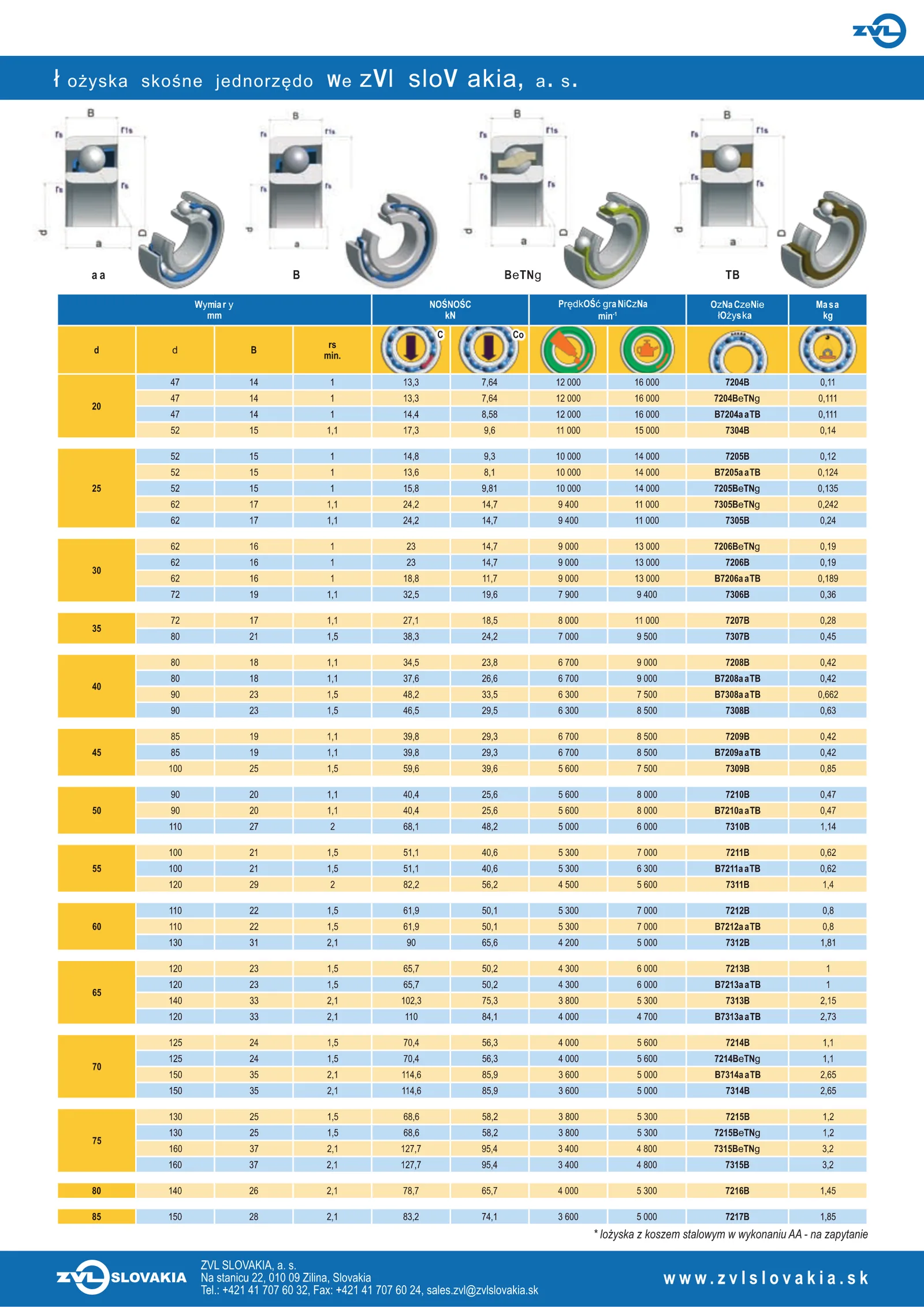
| Article number | d | mm D | B | rs min. | kN C | Co | min -1 | Column 8 | kg |
|---|---|---|---|---|---|---|---|---|---|
| 7204B | 20 | 47 | 14 | 1 | 13,3 | 7,64 | 12 000 | 16 000 | 0,11 |
| 7204BETNG | 20 | 47 | 14 | 1 | 13,3 | 7,64 | 12 000 | 16 000 | 0,111 |
| B7204AATB | 20 | 47 | 14 | 1 | 14,4 | 8,58 | 12 000 | 16 000 | 0,111 |
| 7304B | 20 | 52 | 15 | 1,1 | 17,3 | 9,6 | 11 000 | 15 000 | 0,14 |
| 7205B | 25 | 52 | 15 | 1 | 14,8 | 9,3 | 10 000 | 14 000 | 0,12 |
| B7205AATB | 25 | 52 | 15 | 1 | 13,6 | 8,1 | 10 000 | 14 000 | 0,124 |
| 7205BETNG | 25 | 52 | 15 | 1 | 15,8 | 9,81 | 10 000 | 14 000 | 0,135 |
| 7305BETNG | 25 | 62 | 17 | 1,1 | 24,2 | 14,7 | 9 400 | 11 000 | 0,242 |
45 of 45 products, all 450 values exact
One imported record7204B
Printed on the page
- Article number
- 7204B
- d
- 20
- mm D
- 47
- B
- 14
- rs min.
- 1
- kN C
- 13,3
- Co
- 7,64
- min -1
- 12 000
- Column 8
- 16 000
- kg
- 0,11
- Section
- AA | B | BETNG | TB | Wymiary | NOŚNOŚC | Prędkość graniczna | Oznaczenie | Masa
Added to every record
- Page
- 3
- Title
- Łożyska skośne jednorzędowe ZVL SLOV AKIA, a. s.
- Group
- No group heading on this page
- Notes
- No notes on this page
- Images
- Cropped from the page on import, not shown in this demo
- Needs review
- Nothing flagged on this page
- Checked value by value against hand-made truth tables
- A test fails the build if one value changes
- Headers kept as printed, matched to your fields on import
Layouts it reads
Made for the pages that break importers
Supplier catalogues are designed to be printed, not imported. These are the layouts WISEPIM turns into product rows without any setup.
Merged cells
One value printed for several rows, like a thread size beside four article numbers, is copied to every row it covers. WISEPIM reads the drawn cell borders and shading, not just positions.
Side-by-side tables
Price lists set in narrow column pairs, and two tables next to each other on one page, become one list of products.
Multilingual headers
A description block printed in several languages becomes one section column per language, so every row carries all of them.
Fonts that decode wrongly
Some PDFs use fonts that PDF readers decode wrongly, for example 7204Bb TNd. WISEPIM detects those words and reads them again.
Stacked headers and group headings
Headers over two or three lines are joined, and a group heading between rows becomes a column on the rows below it.
Scanned pages
Pages without a text layer are read with built-in text recognition. Values it is unsure of are flagged for review.
Product photos
Photos printed beside a table are cropped from the page as you see it and attached to its products, up to four per table.
Product cards and line sheets
Grids where each product is a small block of text under a photo are read as products too, with the shared details of the row.
Indexes and repeated articles
A part number index is skipped. An article that appears in two tables, such as dimensions and prices, becomes one product with both.
Why not copy and paste
What a plain text copy loses
Copy the text of a catalogue page and the table falls apart. Values printed once for a group of rows end up on a line of their own, with nothing tying them to the products.
Plain text copy
Text layer of the page, extracted with pdftotext
Wymiary NOŚNOŚC Prędkość graniczna Oznaczenie Masa mm kN min-1 łożyska kg C Co rsd D B min. 47 14 1 13,3 7,64 12 000 16 000 7204B 0,11 47 14 1 13,3 7,64 12 000 16 000 7204BETNG 0,11120Bore size, printed once 47 14 1 14,4 8,58 12 000 16 000 B7204AATB 0,111 52 15 1,1 17,3 9,6 11 000 15 000 7304B 0,14
WISEPIM rows
| Article number | Filled from the merged celld | mm D | B | kg |
|---|---|---|---|---|
| 7204B | 20 | 47 | 14 | 0,11 |
| 7204BETNG | 20 | 47 | 14 | 0,111 |
| B7204AATB | 20 | 47 | 14 | 0,111 |
| 7304B | 20 | 52 | 15 | 0,14 |
Copied text keeps the bore size on one line per group. The importer reads the drawn cell and puts 20 on all four rows.
No silent guesses
It flags doubts instead of guessing
A wrong value in a catalogue import is worse than a missing one. The importer only fills what the page prints and tells you where it was unsure.
Digits are never changed
On scans, a misread separator or letter is restored to match the rest of its column. Digits are never added, dropped or changed.
Doubtful values are named
Values the text recognition was unsure of are listed per product in a Needs review column, so you check those and nothing else.
You see it before it lands
Every import opens on a review of the rows and matched columns. Nothing changes in your catalogue until you confirm.
How it works
From PDF to products in three steps
No templates, no zones to draw, no export to Excel first.
01
Drop the PDF
Open the importer and drop a catalogue, price list or data sheet of up to 64 MB and 400 pages.
Product tables are found without any setup.
02
Check the rows
See each product as a row with its page, section and photos. The importer reports what it read, skipped and flagged.
You know exactly what will be imported.
03
Match columns and import
Match the printed columns to your fields, then import. Values to check stay visible in the review.
Products in your catalogue, ready to enrich.
Before you import
Check your PDF first
Five quick questions tell you whether a file suits the PDF importer. Nothing is uploaded, and you can still review every row before anything changes.
Each product row has its own article, part or order number.
The file is under 64 MB and 400 pages.
No more than 150 pages are scans.
Products sit in tables or product cards.
The file lists several products, not one product drawing.
0 of 5 answered
FAQs
PDF import questions
What it reads, what it needs and where its limits are.
Still have questions?
Can't find the answer you're looking for? Please get in touch with our team.
Contact SupportTurn your supplier PDFs into products
Create a workspace, open the file importer, drop your hardest PDF and review the rows. Nothing changes until you confirm.