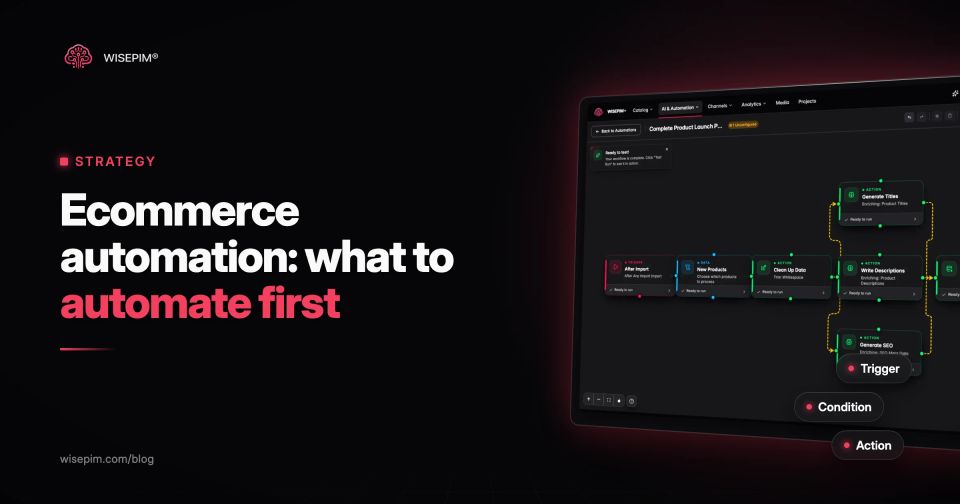
Ecommerce automation is software that runs repeatable store tasks without a person starting each one: tagging orders, reordering stock, sending follow-up emails, updating prices, filling product data and pushing it to channels. IBM defines it as using technology, software and AI to streamline repetitive tasks and workflows for online stores. Almost every tool builds it the same way: a trigger starts a run, conditions decide whether it continues, and actions do the work.
What to automate first depends on where your team loses the most hours to work that follows a clear rule. For most stores that is order handling, stock updates, a few customer emails and, increasingly, product data: getting new products from a supplier file to a complete, translated, published listing. This guide covers the main areas, a worked product data example, the tool categories, a rollout plan and the mistakes that make automations do damage at scale.
Trigger, condition, action: the anatomy of every automation
Every automation, in every tool, can be written as one sentence: when X happens, if Y is true, do Z. Shopify Flow calls the parts triggers, conditions and actions. WooCommerce's AutomateWoo calls them triggers, rules and actions. The names change; the model does not.
- Trigger: the event that starts a run. An order is paid, a product is created, stock drops, a field changes, or a schedule fires (every night at 02:00).
- Condition: the filter. Order total above EUR 150, product in the category Garden, quality score below 70, description empty.
- Action: the work. Tag the order, send an email, create a purchase order, write a description, translate a field, publish to a channel, notify a person.
Writing a process in this form before you open any tool is the most useful exercise in this guide. If you cannot write the condition, the process is not ready to automate; it still needs a person's judgment.
What to automate: six areas with examples
1. Orders and fulfillment
This is where most stores start, because the rules are clear and the volume is high.
- Tag orders by risk, channel or shipping method and route them to the right warehouse queue.
- Hold orders above a value threshold, or with a billing and shipping country mismatch, for manual review.
- Send tracking details to the customer when the carrier label is created.
- Split orders with pre-order items so the in-stock part ships now.
2. Inventory
- Alert the buyer when stock of a fast mover drops below a set number of days of cover.
- Create a draft purchase order when stock hits a reorder point.
- Hide or mark products as out of stock on every channel when the warehouse count reaches zero.
- Sync stock between the webshop and marketplaces so one sale does not cause an oversell elsewhere.
3. Marketing and customer email
- Abandoned cart reminders at set intervals.
- A review request a set number of days after delivery, not after the order date.
- Win-back emails to customers who have not ordered in a set period.
- Back-in-stock notifications for customers who signed up on a sold-out product page.
4. Customer service
- Auto-replies with the order status when a customer asks "where is my order".
- Routing tickets by language or topic to the right person.
- Tagging returns by reason so size and description problems show up in a report.
5. Pricing and promotions
- Start and end a sale at a set date and time instead of someone staying up until midnight.
- Apply a channel markup so marketplace prices cover their commission.
- Flag products where the margin falls below a floor after a supplier price change.
6. Product data: the area most guides skip
Most lists of ecommerce automation stop at orders and email. Product data is often the bigger time sink for catalog teams: every new product needs a title, a description, attributes, a category, images in the right format, translations and a push to each channel. Supplier files rarely deliver all of that, so the same gaps (empty descriptions, missing specs, no category) come back with every new drop. Fixing them by hand each time is exactly the repetitive, rule-based work automation is for.
- Write or rewrite descriptions and SEO fields when a product is imported with an empty description.
- Fill missing attributes (material, dimensions, compatibility) from the supplier data or a web lookup.
- Assign each new product to a category in your tree and in the Google product taxonomy.
- Translate new and changed fields into every store language.
- Resize and convert images to the format each channel expects.
- Re-check completeness every night and send a short list of products that need a person.
- Publish only products that pass a quality check, and hold the rest.
240 garden products, from supplier file to Shopify
A garden retailer receives a supplier file with 240 new products on Monday morning. The products need Dutch, German and French copy, a category, and they should only go live on the Shopify store when complete. Here is the same process written as automations, with the fields each step reads and writes.
- Trigger: after import. The run starts when the supplier file finishes importing, for the 240 new products only.
- Condition: needs work. Continue for products where description is empty, or material, dimensions or category is missing, or the quality score is below 70.
- Action: fill attributes. Read the supplier columns and the EAN, look up missing specs, and write them to material, length_cm, width_cm, weight_kg and color.
- Action: write copy. Generate title, description, short description and meta description from those attributes with a saved prompt for the garden category.
- Action: categorize. Assign the store category and the matching Google product taxonomy category.
- Action: translate. Translate title, description and meta description into Dutch, German and French.
- Condition: quality gate. If the quality score is 70 or higher and required fields are filled, move the product to the stage Ready to publish. If not, keep it in Review and notify the category owner.
- Action: publish. Push products in Ready to publish to Shopify.
A second automation runs on a schedule every night: it re-checks the Garden category for products whose quality score dropped (a supplier update overwrote a field, an image link broke) and posts the list to the team. Nobody audits the catalog by hand; people only look at the exceptions.
Automate or keep a person in the loop: five questions
Not every repeated task should run unattended. Score each candidate on five questions:
Five checks before a task runs unattended
A task that scores well on all five can run unattended. A task that is frequent and rule-based but expensive to get wrong should run automatically up to a review step, such as AI-written copy that lands in a review queue before it is published.
Ecommerce automation tools by category
Few stores need one tool that does everything. Most combine the automation built into their platform with a few specialist tools. These are the main categories and what each is good at:
Ecommerce automation tool categories and what each is good at
| Platform-native workflows | Shopify Flow, a free app for Shopify stores on the Basic plan and up, with some actions limited to higher plans; AutomateWoo, a paid WooCommerce extension sold by Woo | Order and customer events inside one store; AutomateWoo focuses on customer emails, follow-ups and coupons |
|---|---|---|
| Integration platforms | Zapier, Make, n8n | Glue work between apps with no direct integration; hard to maintain once they carry core business logic |
| Email and SMS marketing | Klaviyo | Campaigns triggered by store events and customer segments |
| Inventory and order management | Multichannel order and stock tools | Syncing inventory across channels, routing orders, creating purchase orders |
| Helpdesk | Ticketing tools | Macros, auto-replies and routing rules |
| Feed and channel tools | Google Merchant Center automatic item updates | Updating price, availability and condition from your product pages' structured data when it finds a mismatch; Google says this does not replace keeping your feed current |
| PIM with workflow automation | A product information management system; see PIM workflow automation | The product data itself: enrichment, categorization, translation, quality checks and publishing to every channel from one record |
When you compare tools, check four things: which triggers it can listen to on your platform, whether conditions can read the fields you need, whether it keeps a run history you can inspect, and how a failed run is reported.
Rolling out ecommerce automation one process at a time
- Map the week. List the tasks your team repeats, with how often they happen and how long each takes. Two weeks of honest notes beats any estimate.
- Pick one process. Choose the one with high frequency, a clear rule and a cheap mistake. Order tagging, low-stock alerts or descriptions for new imports are typical first picks.
- Write it as trigger, condition, action. On paper first, including what should happen when the condition fails.
- Test on a small set. Run it on 10 orders or 20 products in a draft or test mode and compare the result with what a person would have done.
- Turn it on with monitoring. Check the run history daily for the first two weeks. Set an alert for failed runs so errors do not pile up silently.
- Add the next process. Only after the first one has run cleanly for a few weeks. Give every automation an owner and a short description of what it does.
Loops, silent failures and five other automation traps
- Automating on top of bad data. A rule that reads an empty category field puts every product in the wrong collection. Clean the input first.
- Loops. An automation triggered by "product updated" that updates the product triggers itself again. Narrow the trigger to a specific field or add a condition that stops the second run.
- No owner. Automations built by someone who left the company keep running long after anyone remembers why.
- Silent failures. A sync that stopped three weeks ago looks the same as one that works, until a customer orders something that is not in stock.
- Publishing AI output without review. Generated copy should pass a quality check or a person before it goes live, at least until you trust the prompt for that category.
- Overlapping tools. Two tools that both update stock or price on the same channel will overwrite each other. Decide which system owns which field.
- Feeds that change faster than the channel can follow. Google warns that Merchant Center's automatic item updates may not work for products whose price or availability changes often (for example more than once a day), and that such products may be disapproved instead of updated.
What automation saves, and what it does not
- Hours on repeat work: the main gain is time no longer spent on tasks that follow a rule, such as tagging, alerts and filling the same fields on every new product.
- Fewer copy-paste errors: a rule applies the same way on the 500th run as on the first, so typos and skipped steps drop.
- Speed to market: products go live when they are ready, not when someone has time to process the supplier file.
- What it does not fix: wrong source data, unclear ownership and decisions that need judgment. Automation repeats whatever you give it, at scale.
Measuring whether an automation is worth it
Measure before and after on the numbers the process affects, not on how many automations you run. For order automations that is time from payment to shipment and the share of orders a person touches. For product data it is time from supplier file to published product, the share of products that pass your quality checks, and how many products wait in review. Write the baseline down before you turn the automation on, or you will not be able to tell what changed.
Automating product data from import to publish
WISEPIM automates the product data side. Its automations start on events such as product created, product updated, a field or quality score change, a lifecycle stage change, a schedule or a manual run, and chain actions like AI enrichment, translation, category assignment, field updates, notifications, webhooks and publishing to a channel. Quality Guard scores each product so a condition can hold incomplete ones back, and lifecycle stages give the review step a place to live. Opt-in auto-sync then pushes saved products to connected channels such as Shopify, WooCommerce, Magento 2 and Lightspeed eCom through platform sync.
